Introduction
How to run ChatGPT ads is a question businesses are beginning to explore following the launch of advertising within ChatGPT. This introduces a new way for brands to reach potential customers while they research products, compare services, and explore solutions through conversations. Unlike traditional search and social media advertising, ChatGPT ads bring sponsored placements into a conversational environment, creating a different context for brand discovery. For businesses looking to explore this channel, understanding how campaigns are set up, how audience relevance works, and how performance is measured is essential.
This guide walks you through the steps to plan, launch, and manage your first ChatGPT advertising campaign.
What Are ChatGPT Ads and How Do They Work?
ChatGPT advertising allows businesses to display sponsored placements within the ChatGPT experience. These advertisements appear separately from ChatGPT’s organic responses and are clearly identified as sponsored content.
For example, imagine someone asking ChatGPT:
“What are the best project management tools for a small business managing remote teams?”
A relevant project management software advertisement may appear below the response, giving the user an opportunity to explore the advertiser’s offering.
Here’s how the process works:
- Conversational context: The advertising system considers the subject and intent of the current conversation.
- Ad relevance: It evaluates the advertiser’s headline, description, landing page, targeting selections, and additional context hints.
- Sponsored placement: Relevant ads may appear below a ChatGPT response, separately from the answer.
- User interaction: Users can view the advertisement and click through to the advertiser’s landing page.
Advertisers can provide context hints at the ad group level to describe the conversations, topics, and customer needs where their offerings may be relevant. These hints help guide ad matching but do not work like exact-match keywords or guarantee placement in a particular conversation.
Another important distinction is that paid placements do not influence ChatGPT’s answers. The advertising system operates separately from the system generating responses.
To understand how ads appear in ChatGPT, refer to OpenAI’s official explanation of the advertising experience.
How to Run ChatGPT Ads Step by Step
Launching a ChatGPT ads campaign involves setting up an advertiser account, defining your campaign objective, organizing ad groups, creating advertisements, and monitoring performance.
Here’s how businesses can approach the process.
Step 1: Set Up Your Advertising Account
The first step is creating an account in OpenAI Ads Manager, the platform used to create, launch, and manage ChatGPT advertising campaigns.
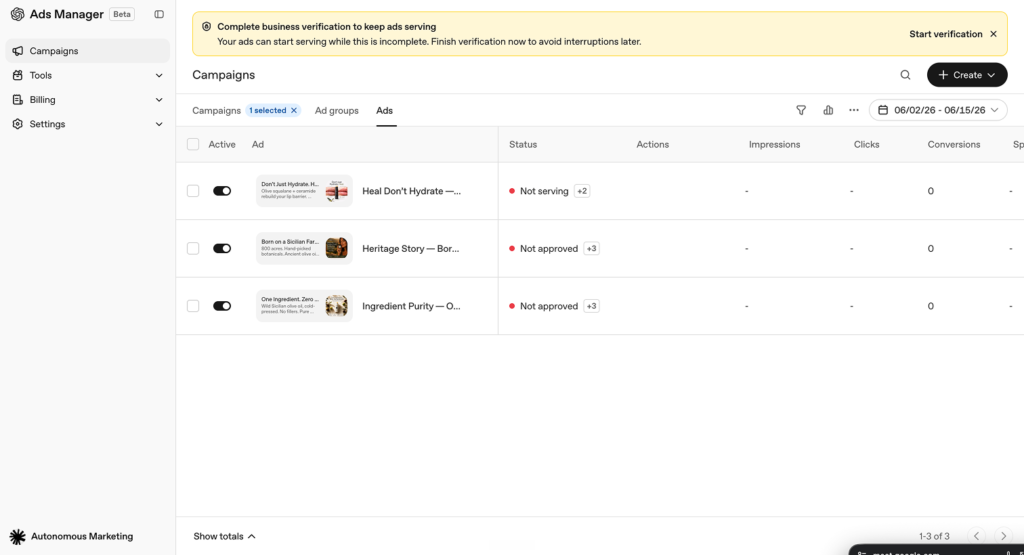
Follow these steps:
- Visit ads.openai.com.
- Sign in using an existing OpenAI account or create a new account.
- Enter your business details and complete the advertiser account setup.
- Add your brand logo and review your account information.
- Configure your billing profile and add a payment method.
- Complete the required account and business verification.
- Invite team members who need access to manage campaigns.
You can either enter your website URL during onboarding to begin creating an advertisement or skip this step and build your campaign later from Ads Manager.
Check advertiser availability before planning your launch. Self-service access depends on the country where the legal entity being billed is based. India is currently included in OpenAI’s published list of countries with self-service availability, although individual account verification and campaign approval requirements still apply.
You can follow the OpenAI Ads Manager Quickstart for the official account setup and campaign creation process.
Step 2: Choose Your Campaign Objective
Once your account is ready, the next step is selecting what you want your ChatGPT ads campaign to achieve.
Your campaign objective determines how the advertising system optimizes delivery and how you pay for advertising.
OpenAI currently supports three main campaign objectives:
1. Reach (CPM)
Choose this objective when your primary goal is increasing brand visibility and reaching more users.
You pay based on every 1,000 ad impressions.
Example: A newly launched SaaS company wants more business owners to become familiar with its project management platform. A Reach campaign can help increase exposure among relevant audiences.
2. Clicks (CPC)
Choose this objective when you want users to visit your website, explore your services, or learn more about your products.
You pay for valid ad clicks.
Example: An accounting software company wants to direct business owners to its product page, where they can explore features and pricing. A Clicks campaign would be relevant to this goal.
3. Conversions
Choose this objective when you want to optimize advertising delivery towards a specific supported action, such as a purchase, registration, or lead submission.
This objective requires conversion measurement to be configured.
Example: A business offering a free software consultation wants to generate appointment requests through its website. It can configure a lead-submission event and select it as the campaign’s conversion goal.
How should you choose?
Start with the action that matters most to your business. If your immediate priority is awareness, consider Reach. If website visits are the goal, consider Clicks. If you want measurable actions such as registrations or enquiries, consider Conversions and prepare your tracking setup before launching.
Step 3: Define Your Target Audience
Audience relevance is an important part of a successful ChatGPT ads strategy.
Instead of approaching audience selection only through broad demographic assumptions, consider the situations in which potential customers might need your product or service.
ChatGPT Ads offers campaign-level targeting options, including:
- Location targeting: Select supported countries where your advertisements should be eligible to appear.
- Platform targeting: Choose supported environments such as desktop web, mobile web, and iOS or Android apps.
- Custom audiences: Include or exclude supported customer audiences where available and eligible.
You can also use context hints within ad groups to explain when your offering may be relevant.
Example: Marketing automation software
Suppose you offer marketing automation software for small and medium-sized businesses.
A useful context hint could be:
“Marketing automation software for growing businesses looking to manage email campaigns, customer follow-ups, and lead nurturing from one platform.”
This describes the product, its intended users, and the business need it addresses.
Compare that with a generic hint such as “Marketing software.” The more specific description provides additional information about the offering and its relevance.
Remember that context hints guide the advertising system’s understanding of relevance. They are not exact-match keywords, audience filters, or instructions that guarantee an advertisement will appear in a particular conversation.
Step 4: Create Your Ad Copy and Creatives
Your advertisement needs to communicate what you offer and why someone might find it useful.
In ChatGPT Ads Manager, an ad can include:
- Advertiser name and brand logo.
- Ad headline or title.
- Descriptive ad copy.
- Relevant image creative.
- Landing page URL.
OpenAI’s advertising guidance emphasizes clear, specific, benefit-focused messaging.
For example, consider a company offering accounting software.
Generic ad messaging:
“Discover our advanced accounting software. Explore our platform today.”
More relevant ad messaging:
“Manage Business Finances with Less Manual Work. Track expenses, organize invoices, and simplify financial reporting with accounting software designed for growing businesses.”
The second example communicates the product’s practical value and identifies the audience it serves.
When developing your creatives, keep these points in mind:
- Lead with a clear benefit: Explain what the customer can accomplish using your product or service.
- Make the audience relevant: Address a specific customer requirement instead of using broad promotional statements.
- Use appropriate visuals: Choose images that represent the actual product, service, or business offering.
- Maintain landing-page consistency: Ensure the destination page explains the same product, benefits, and offer mentioned in the advertisement.
- Test different messages: Create variations that highlight different customer benefits and compare their performance.
A relevant advertisement should help users understand the value of your offering before they decide whether to click.
Step 5: Set Your Budget and Launch the Campaign
After preparing your campaign, ad groups, and advertisements, the next step is budget planning.
OpenAI Ads Manager allows advertisers to configure campaign budgets, schedules, and targeting. For Clicks campaigns, advertisers can also set maximum CPC bids at the ad group level. Reach campaigns use CPM bidding.
Before setting your budget, consider:
1. Campaign objective: Your chosen objective determines the relevant buying model and optimization approach.
2. Test duration: Allow enough time to gather meaningful performance data rather than making decisions based on a few early impressions or clicks.
3. Audience and campaign scope: Start with a clearly defined audience and business objective. Avoid dividing a limited budget across too many unrelated campaigns.
4. Creative variations: Allocate room to test different headlines, descriptions, and creative approaches.
Once your campaign details are ready:
- Review your campaign objective and budget.
- Check the ad group structure and context hints.
- Verify audience targeting and selected locations.
- Review ad copy, creative assets, and landing page URLs.
- Submit the campaign for OpenAI’s review.
Your campaign can begin delivering after it passes review and the account, billing, and campaign requirements are met. Check the campaign status in Ads Manager to confirm that your advertisements are serving.
Practical tip: For an early campaign, begin with one clear objective and a controlled test budget. Use the initial results to understand which messages and audience contexts are producing better engagement before expanding your campaign.
Step 6: Track and Optimize Campaign Performance
Launching your campaign is only the beginning. Once your advertisements start serving, you need to understand how users interact with them and whether they are contributing to your campaign objectives.
This is where AI advertising requires a measurement-led approach. OpenAI Ads Manager provides reporting across campaigns, ad groups, and individual advertisements.
Start by monitoring these metrics:
- Impressions: How many times your advertisement was displayed.
- Clicks: How many times users clicked your advertisement.
- CTR (Click-Through Rate): The percentage of impressions that resulted in clicks.
- Average CPC: The average amount spent per valid click.
- Average CPM: The average cost for every 1,000 impressions.
- Conversions: The number of attributed conversion events, provided conversion measurement is configured.
For example, imagine your campaign receives 10,000 impressions and 300 clicks.
Your CTR would be:
CTR = (Clicks ÷ Impressions) × 100
CTR = (300 ÷ 10,000) × 100 = 3%
This gives you a way to understand how frequently users click after seeing your advertisement.
Once you have enough performance data, consider these optimization activities:
Review ad engagement: Compare different headlines, descriptions, and creatives to identify which messages attract more clicks.
Evaluate audience relevance: Review campaign and ad group performance to understand which targeting selections and context hints are associated with stronger engagement.
Check landing-page performance: Compare advertising clicks with website activity and completed actions to identify potential gaps in the user journey.
Review campaign spending: Monitor average CPC, CPM, and total spend to understand how efficiently your budget is being used.
Improve conversion measurement: If lead generation or sales are your objectives, configure the OpenAI Pixel or Conversions API to measure eligible actions.
Use these insights to refine your advertisements and improve campaign performance over time.
How to Measure the Performance of ChatGPT Ads
Measuring advertising performance helps businesses understand whether their investment is contributing to their marketing objectives. A well-planned ChatGPT ads strategy should consider both advertising engagement and the actions users take after visiting the website.
Here are the key metrics to include in your reporting:
| Metric | What it tells you |
| Impressions | Total number of ad displays |
| Clicks | Number of users who clicked the advertisement |
| CTR | Percentage of impressions that generated clicks |
| Average CPC | Average cost per click |
| Average CPM | Cost per 1,000 impressions |
| Conversions | Attributed actions such as purchases or lead submissions, when tracking is configured |
However, looking at these metrics individually may not give you the complete picture.
For example, a campaign generating a high number of clicks may still produce fewer enquiries if the landing page does not match the advertisement’s promise.
To measure performance more effectively, consider the following:
1. Measure Engagement
Compare impressions, clicks, and CTR to understand whether your advertisements are attracting attention. If impressions are high but clicks are low, review the relevance of your headline, messaging, and creative.
2. Evaluate Advertising Costs
Monitor average CPC and CPM to understand how much you are spending to generate clicks and impressions. Compare these figures across campaigns and ad groups to identify differences in delivery efficiency.
3. Track Website Conversions
If your objective is lead generation, configure conversion tracking using the OpenAI Pixel, Conversions API, or both. You can measure actions such as completed enquiry forms, registrations, and purchases when the relevant events are configured.
You can also add UTM parameters to your landing-page URLs to identify ChatGPT Ads traffic in your existing analytics tools.
4. Connect Advertising Performance with Business Outcomes
Compare advertising reports with your website analytics and CRM data. Look beyond the number of clicks to understand how many enquiries become qualified leads and how many eventually contribute to revenue.
Businesses looking to manage campaign performance across different advertising channels can explore our paid advertising services to understand how structured campaign management and performance analysis support business objectives.
Common Mistakes to Avoid When Running a ChatGPT Ads Campaign
As businesses explore this emerging advertising platform, the initial campaign setup can influence how effectively they use their advertising budget.
Here are some common mistakes to watch out for when running a ChatGPT ads campaign.
1. Launching Without a Clear Campaign Objective
Running advertisements without defining the desired outcome makes performance evaluation difficult.
For example, a business focused on generating enquiries may choose a Reach objective and then evaluate the campaign based on lead volume. The objective and measurement approach should align with each other.
What to do: Decide whether your priority is brand awareness, website clicks, or conversions before creating your campaign.
2. Using Generic Ad Messaging
Broad promotional statements may fail to communicate why your offering is relevant to a potential customer.
For example, “Explore our business solutions” gives users little information about what the company actually provides.
What to do: Highlight a specific product benefit, customer requirement, or use case in your advertisement.
3. Treating Context Hints Like Traditional Keywords
Context hints help ChatGPT’s advertising system understand when an advertisement may be relevant. They do not function like exact-match search keywords or guarantee placement.
What to do: Describe your product, ideal customer requirements, and relevant situations in natural, specific language.
4. Sending Users to Irrelevant Landing Pages
An advertisement may generate clicks, but users can leave without taking action if the landing page does not address what the ad promised.
What to do: Match the advertisement’s messaging with the destination page. If your ad promotes a free consultation, direct users to a page where they can understand the offer and submit an enquiry.
5. Ignoring Conversion Tracking
Clicks and impressions show how users interact with your advertisements, but they do not independently establish how many leads or sales your campaign generates.
What to do: Configure conversion measurement before launching conversion-focused campaigns. Test whether important events are being received and attributed correctly.
6. Making Changes Without Enough Performance Data
Early campaign results can fluctuate, particularly while the advertising platform is in beta. Making frequent changes based on limited data can make it difficult to understand which adjustments are working.
What to do: Allow sufficient time for performance data to accumulate. Review results at regular intervals and make changes based on measurable patterns rather than individual fluctuations.
Conclusion
ChatGPT advertising introduces another opportunity for businesses to reach audiences through conversational experiences. However, successful campaigns still depend on clear objectives, relevant messaging, appropriate audience selection, and consistent performance measurement.
Understanding how to run ChatGPT ads is the first step. Businesses should approach early campaigns as structured tests, evaluate engagement and conversions, and use performance insights to refine their advertising strategy.
As the platform continues to evolve, staying informed about new advertising features and measurement capabilities will also help businesses make better campaign decisions.
Looking to explore emerging advertising channels and build campaigns around measurable business goals? Explore our digital marketing services and connect with Gravitas Consulting to discuss your marketing requirements.